
ApexCrawl + ApexScouty
Find winning Amazon products across 23 marketplaces before your competitors do.
Analyze Amazon, Shopify stores and supplier catalogs in one platform. ApexCrawl collects the products; ApexScouty returns supplier price, Amazon price, fees, profit and ROI in one view — in minutes, not hours.
Use them together, or buy either one on its own.
Two apps.
One workflow.
Each one is a complete product on its own. Connected, they remove the manual step between finding a product and knowing what it is worth.
Buy either app on its own, or run both from a single account — that is where the one-click transfer lives.
Collect
ApexCrawl
Turns any Shopify store or Amazon category into a clean product file.
- Add a store URL and let the system verify it
- Scan every product, price and variant on the store
- Filter by stock, URL path, currency or price range
- Follow crawl jobs live and export the CSV
- Send a finished crawl to ApexScouty in one click — or upload it manually to any scout program
Analyze
ApexScouty
Turns that file into a short list of products worth buying.
- Reads vendor files, wholesale lists and supplier sheets — including other CSV exports
- Matches every row to the Amazon catalogue
- Apex Crawl, Helium10,Keepa,Supplier Csv
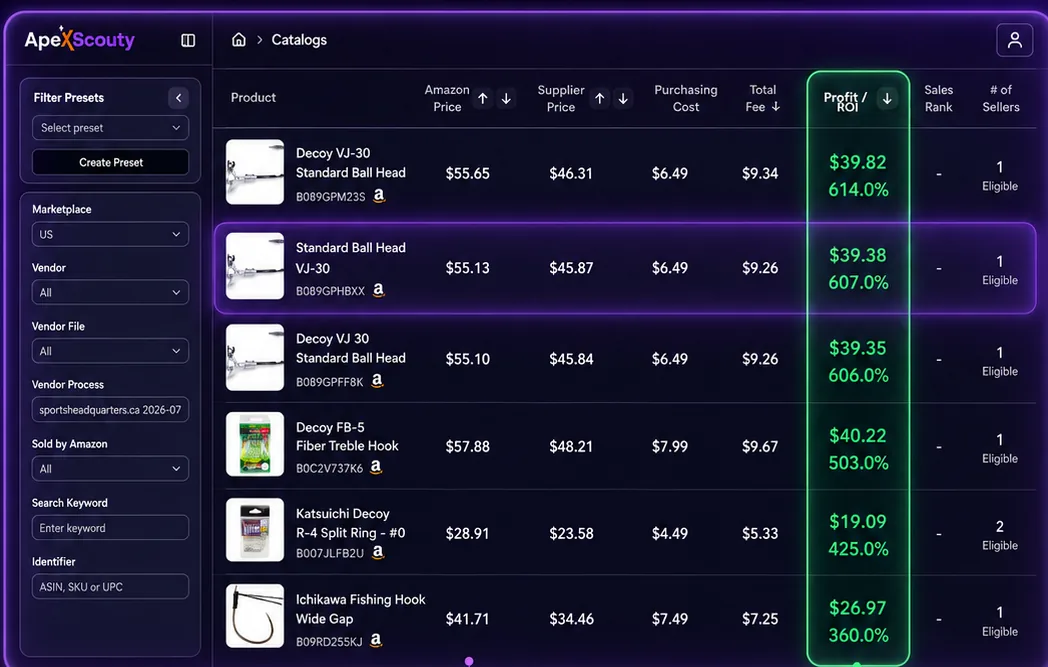
- Amazon price, supplier price, purchasing cost and fees
- Profit and ROI per product, sorted highest first
- Seller count and Buy Box eligibility at a glance
Source in one country and sell in the same one — analyse any supplier list against the local Amazon.
Before you start.
Do I have to buy both apps?
No. ApexCrawl works on its own if you only need product data, and ApexScouty analyses any CSV you already have. The one-click transfer between them becomes available when both are active on the same account.
Which countries are covered?
23 Amazon marketplaces, including the United States, Canada and the United Kingdom. You pick the marketplace a file is analysed against, and you can run the same file against more than one.
Where does the product data come from?
From the public product pages of the Shopify stores and Amazon listings you point the crawler at. You choose the sources.
Can I analyse a supplier list instead of a crawl?
Yes. ApexScouty reads vendor files, wholesale catalogues and distributor price sheets the same way it reads a crawl export.
How many products can I scan?
Scan volume depends on your plan and quota. Current limits are listed on the pricing page of each app.
Do I need to install anything?
No. Both apps run in the browser. You add a store, start a crawl, and work from the results.
What do Apex users say?
Why ApexScouty?
Same job, wider reach. Here is where most tools stop and where Apex keeps going.
From a store link
to a buying decision.
One file moves through the whole path. Nothing leaves the system as a spreadsheet you have to clean up by hand.
Add the store
Paste a Shopify store URL. ApexCrawl verifies it and creates the record.
Run the crawl
Every product, price and variant is scanned while you watch the job progress.
Send it over
One click moves the finished file into ApexScouty — or export it and upload to any scout program.
Read the margins
Pick a marketplace and every row comes back with profit and ROI attached.
ApexCrawl
Collect the products
nobody else is looking at.
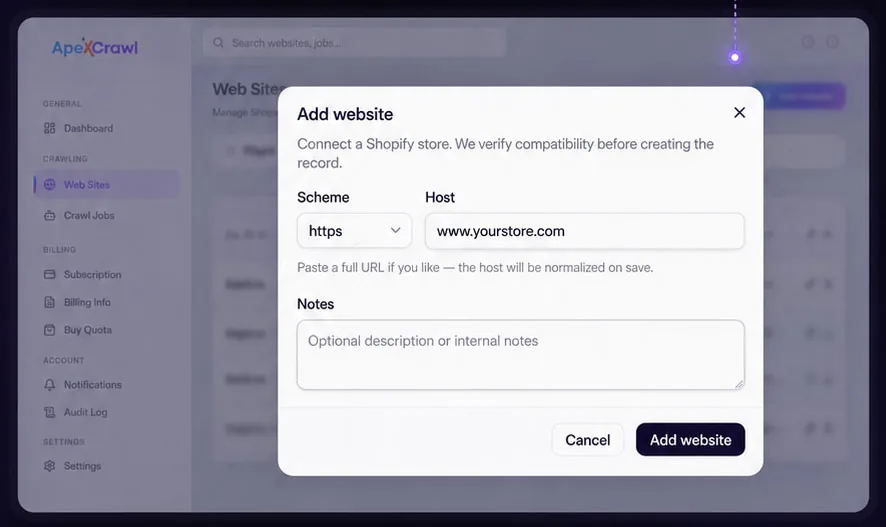
Add a store
Paste a full URL. Compatibility is checked before the record is created.
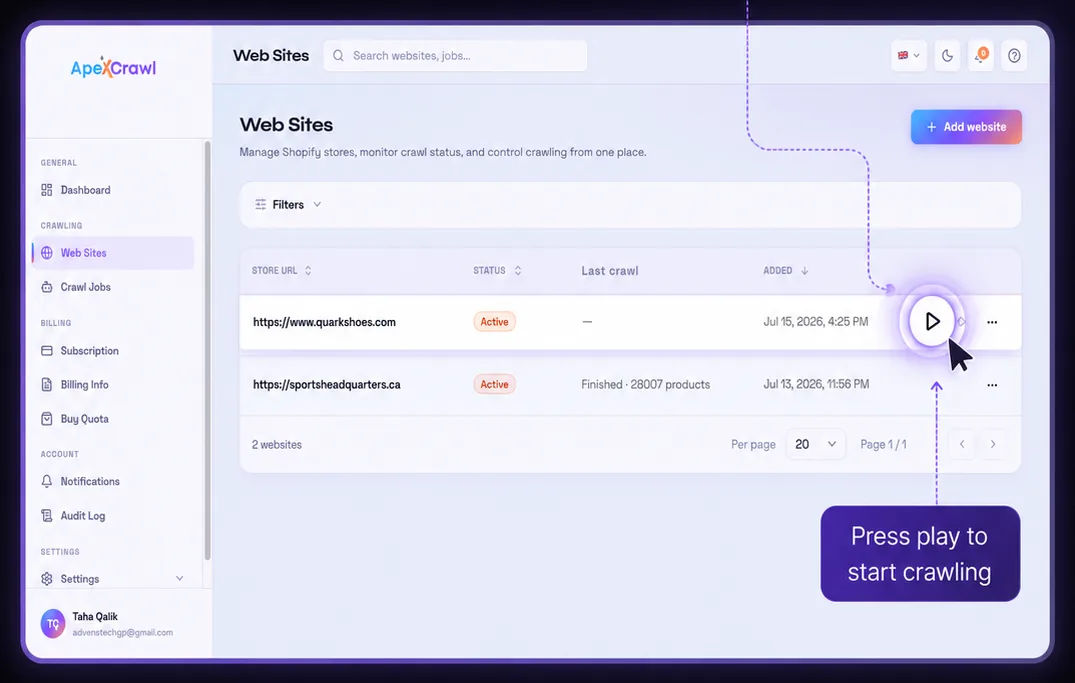
Start crawling
Press play on a store and the scan begins. Status and product counts update as it runs.
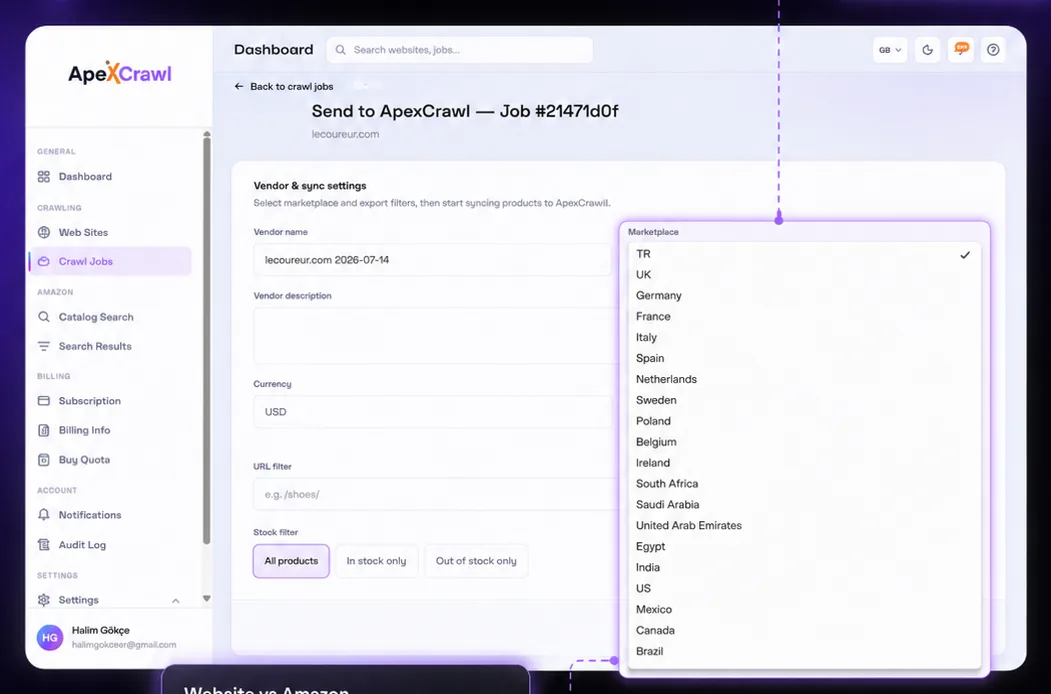
Set the market and filters
Choose the country, currency, URL path and stock rule before the file is exported.
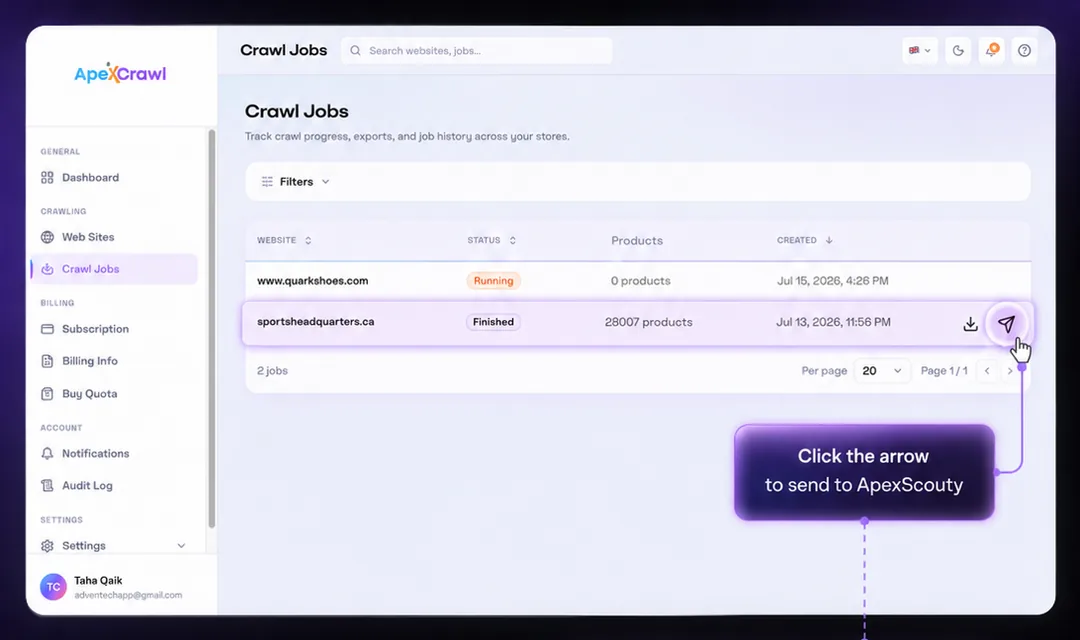
Send finished jobs
A finished crawl transfers straight to ApexScouty, ready for analysis.
ApexScouty
Turn the file
into a shortlist.
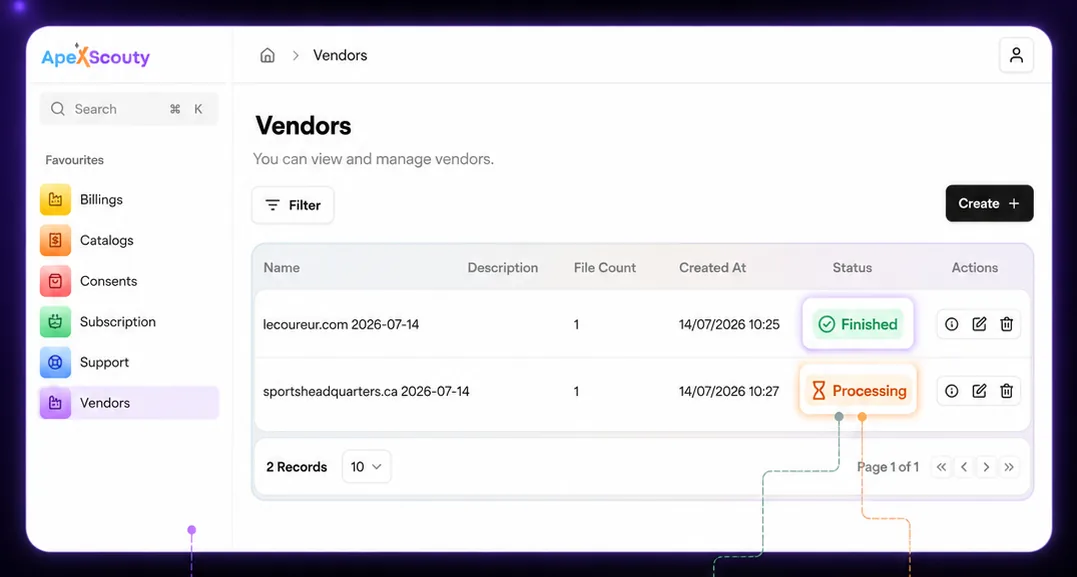
Files arrive in Vendors
Completed files are marked Finished, while running ones stay Processing.
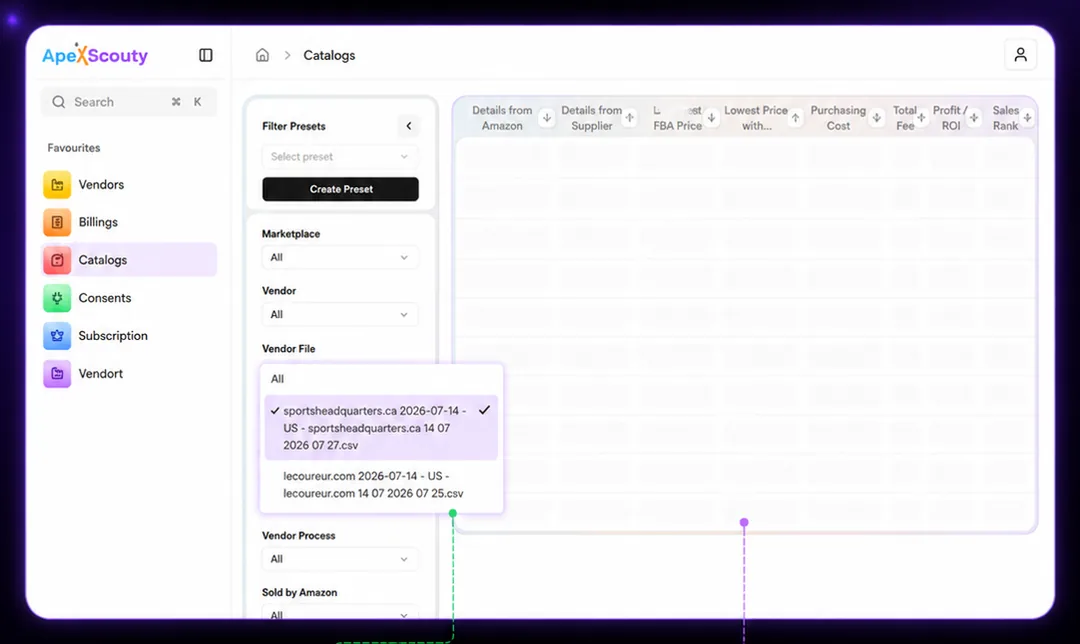
Pick the file to analyse
Choose which vendor file moves into Catalogs for comparison.
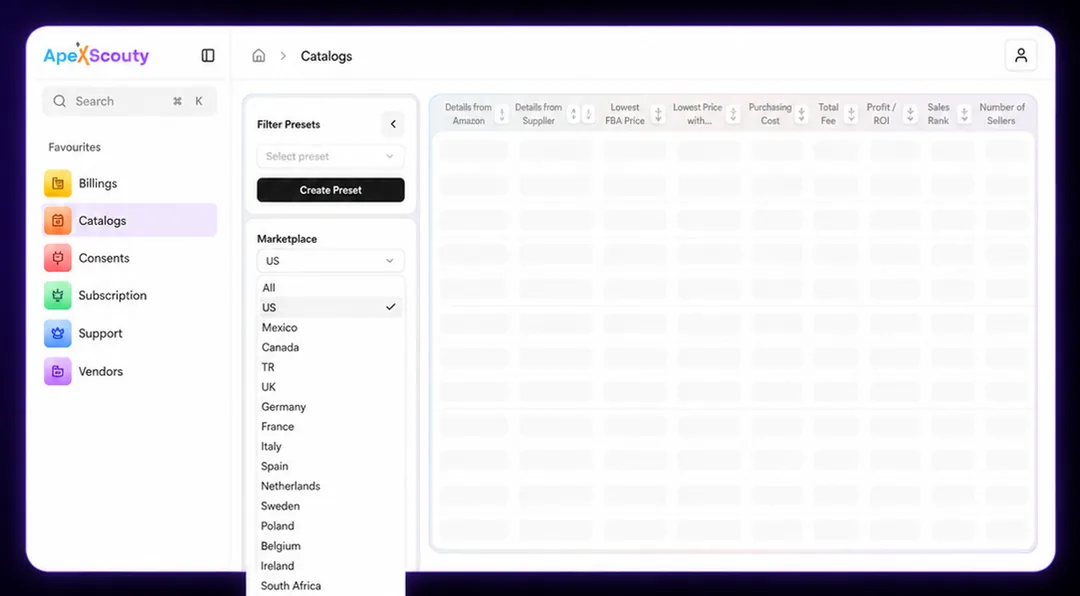
Choose the marketplace
Select the Amazon marketplace you sell in and compare supplier products with local data.
Read the profit on every product
Each product lands with supplier price, Amazon price, fees, profit and ROI — sorted so the best margins come first.
What you get
out of the box.
Local sourcing
Scan stores inside the country you already sell in, so the product never has to cross a border.
Profit and ROI
Purchasing cost, total fee, net profit and ROI land on every row, ready to sort.
Live crawl status
Watch a store crawl run and pick the file up the moment it is marked finished.
Any CSV works
A wholesale catalogue or distributor price sheet analyses exactly like a crawl file.
23 marketplaces
Run the same supplier list against any Amazon marketplace you sell in, one at a time.
Filter presets
Save the marketplace, vendor and keyword filters you use most and reuse them on every file.
What you actually
walk away with.
✓
Profitable products in minutes
Skip the one-by-one checking. The best margins surface at the top of the list.
✓
10+ hours saved every week
Sourcing and analysis that used to take a full day now runs while you do other work.
✓
Thousands of products at once
Analyse a whole catalog in a single pass instead of testing a handful at a time.
Start with one.
Add the other when you need it.
Crawl a store, send the file over, and see what the numbers say in your first session.
Works in 23 Amazon marketplaces · Nothing to install